
Best Free Ai Tools For Small Businesses
Small businesses in 2026 operate in a highly competitive digital environment where efficiency, speed, and automation are essential for growth.
Artificial Intelligence (AI) tools are now widely used to handle content creation, marketing, design, customer support, and daily business operations.
The best part is that many powerful AI tools offer free plans, making them accessible for startups, freelancers, and small business owners.
This guide covers the best free AI tools for small businesses and shows how they can be used effectively in real business workflows.
Quick Comparison Table
| Tool | Best For | Free Plan | Ease of Use | Rating |
|---|---|---|---|---|
| ChatGPT | Content & Strategy | Yes | Easy | 9.5/10 |
| Canva AI | Design & Branding | Yes | Easy | 9/10 |
| Grammarly | Writing | Yes | Very Easy | 8.5/10 |
| Notion AI | Productivity | Limited | Medium | 8/10 |
| HubSpot AI | CRM & Marketing | Yes | Medium | 8.5/10 |
| Zapier AI | Automation | Yes | Medium | 8.5/10 |
| Copy.ai | Marketing Copy | Yes | Easy | 8/10 |
| Perplexity AI | Research | Yes | Easy | 8.5/10 |
| Gamma | Presentations | Yes | Easy | 8/10 |
| Tidio AI | Customer Support | Yes | Medium | 8/10 |
| Fireflies AI | Meetings | Yes | Easy | 8/10 |
How These AI Tools Work Together
Small businesses get the best results when these tools are used together in a workflow:
- ChatGPT creates content, ideas, and marketing copy
- Canva AI turns ideas into visuals and social media posts
- Zapier AI automates tasks and connects apps
- Grammarly improves communication quality
- Tidio AI manages customer interactions
This combination helps small businesses operate efficiently without large teams.
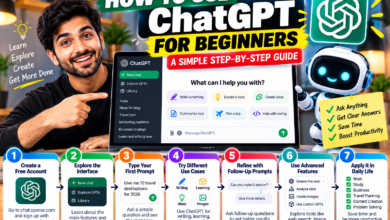
1. ChatGPT
| Feature | Details |
|---|---|
| Best For | Content creation and marketing |
| Key Features | Writing, brainstorming, emails, strategy |
| Pros | Fast, flexible, easy to use |
| Cons | Requires fact-checking |
| Verdict | Essential AI tool for all businesses |
Use Case
A small online store uses ChatGPT to create product descriptions, ad copy, and email campaigns in minutes.
2. Canva AI
| Feature | Details |
|---|---|
| Best For | Graphic design and branding |
| Key Features | AI images, templates, logos |
| Pros | Beginner-friendly, fast design creation |
| Cons | Some premium elements paid |
| Verdict | Best tool for visual marketing |
Use Case
A bakery creates daily Instagram posts and promotional banners without hiring a designer.
3. Grammarly
| Feature | Details |
|---|---|
| Best For | Writing improvement |
| Key Features | Grammar correction, tone improvement |
| Pros | Improves professionalism |
| Cons | Advanced features paid |
| Verdict | Essential for business communication |
4. Notion AI
| Feature | Details |
|---|---|
| Best For | Productivity and organization |
| Key Features | Notes, task management, summaries |
| Pros | All-in-one workspace |
| Cons | Learning curve for beginners |
| Verdict | Best for business organization |
5. HubSpot AI
| Feature | Details |
|---|---|
| Best For | CRM and marketing automation |
| Key Features | Lead tracking, email automation |
| Pros | Powerful free CRM system |
| Cons | Advanced features require upgrades |
| Verdict | Best for growing businesses |
6. Zapier AI
| Feature | Details |
|---|---|
| Best For | Automation |
| Key Features | App integration, workflow automation |
| Pros | Saves manual work |
| Cons | Limited free usage |
| Verdict | Best automation tool for small businesses |
7. Copy.ai
| Feature | Details |
|---|---|
| Best For | Marketing content creation |
| Key Features | Ad copy, product descriptions |
| Pros | Fast content generation |
| Cons | Requires editing |
| Verdict | Good for ecommerce and marketing teams |
8. Perplexity AI
| Feature | Details |
|---|---|
| Best For | Research and information gathering |
| Key Features | Web search with sources |
| Pros | Fast and accurate answers |
| Cons | Limited deep analysis |
| Verdict | Best AI research assistant |
9. Gamma
| Feature | Details |
|---|---|
| Best For | Presentations |
| Key Features | AI-generated slides and reports |
| Pros | Saves time |
| Cons | Limited customization |
| Verdict | Great for business presentations |
10. Tidio AI
| Feature | Details |
|---|---|
| Best For | Customer support |
| Key Features | Chatbots, live chat automation |
| Pros | Improves response time |
| Cons | Setup required |
| Verdict | Best for eCommerce support |
11. Fireflies AI
| Feature | Details |
|---|---|
| Best For | Meetings |
| Key Features | Meeting transcription and summaries |
| Pros | Saves time in meetings |
| Cons | Free plan limitations |
| Verdict | Best for remote teams |
Free vs Paid AI Tools
Free AI tools are ideal for startups, freelancers, and small businesses that are just getting started.
Paid versions become useful when scaling operations, increasing automation, or managing larger teams.
Recommendation
For beginners, the best starting combination is:
- ChatGPT for content creation
- Canva AI for design
- Zapier AI for automation
This setup covers the core needs of most small businesses at no cost.
AI tools have become an essential part of modern small business operations.
The key to success is not using more tools, but using the right combination of tools effectively through a structured workflow.
Businesses that adopt AI early gain a strong advantage in productivity, marketing, and scalability.
What are the best free AI tools for small business?
ChatGPT, Canva AI, and Zapier AI are the most widely used and effective tools.
Are free AI tools enough for small businesses?
Yes, most small businesses can start and operate effectively using free plans.
Which AI tool is best for marketing?
ChatGPT and Canva AI together form the strongest marketing combination.
Can AI replace employees?
AI supports business operations but does not fully replace human decision-making.
About The Author