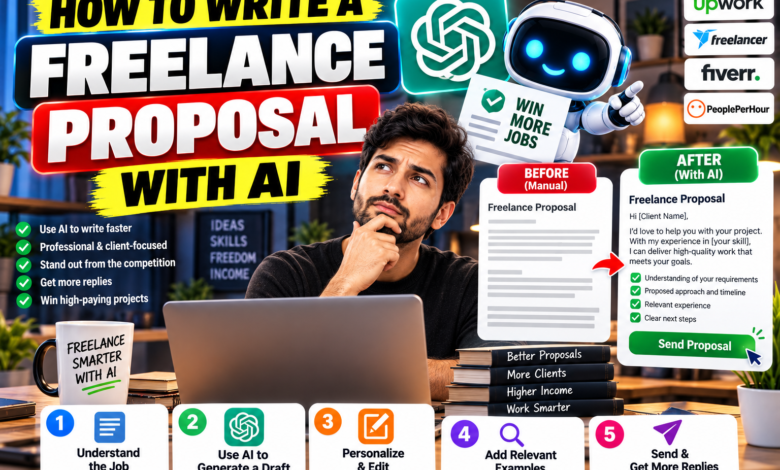
How to Write a Freelance Proposal with AI, without sounding like a robot :
A good proposal doesn’t need to be long. It needs to show the client you understood their problem and know how to solve it. AI tools like ChatGPT and Claude can get you a clean first draft in a few minutes, but the draft only works if you feed it real details and then edit it yourself.
This guide shows the exact steps and prompts, so you can write a proposal in about 20 minutes instead of two hours.
Why most proposals get ignored
- They start with “I am a hardworking freelancer with 5 years of experience” instead of the client’s problem.
- They look copy-pasted. Clients can tell within two lines.
- They bury the price, the timeline or what’s included.
- They have no clear next step.
What a winning proposal contains
- A short opening that repeats the client’s goal in your own words
- Your plan: what you’ll do and in what order
- Deliverables and timeline
- Price and what’s included
- One or two relevant examples of past work
- A clear next step, such as “reply to confirm and I’ll send the invoice”
Step-by-step: write your proposal with ChatGPT or Claude
Step 1: Collect the facts first
Before opening any AI tool, write down five things: the client’s goal, their deadline, their budget (if given), what they’ve already tried, and the one thing that worries them. AI can’t guess these, and this is what makes the proposal feel personal.
Step 2: Ask AI to find the real problem
Paste the client’s job post or message and use this prompt:
Here is a client’s project description: [paste]. In 5 bullet points, tell me what the client really wants, what they might be worried about, and what questions I should ask before quoting.
This often shows a hidden need, such as “they want it fast” or “they’ve been burned by a past freelancer.”
Step 3: Generate a first draft
Write a freelance proposal under 250 words for this client. My service: [e.g., blog writing]. My experience: [2 real facts]. Client goal: [goal]. Timeline: [timeline]. Price: [price]. Tone: friendly, direct, no buzzwords. Start with the client’s problem, not with me.
Always give it real details. The more specific you are, the less generic the result.
Step 4: Make it sound like you
Read the draft out loud. Cut anything you wouldn’t say to a person. Replace phrases like “I am excited to leverage my expertise” with plain words such as “I can handle this.” Then run this prompt:
Rewrite this in a more casual, confident voice. Use short sentences. Remove corporate words. Keep all facts unchanged.
Step 5: Add proof
Add one real example, link or result from your own work. AI can’t invent your portfolio, and you shouldn’t let it try. If you have no past clients yet, offer a small sample or a clear plan for the first week instead.
Step 6: Check the numbers and promises
Confirm the price, dates, number of revisions and deliverables. A single wrong number in a proposal can cost you the job or create a dispute later.
Step 7: Send it fast
Replying quickly shows you’re serious, so keep your prompts saved in a note and reuse them. Just never skip the editing step.
Example proposal skeleton
Use this structure and fill it with your own details:
Hi [Name],

Thanks for sharing the details. It sounds like you need [client's goal] by [date], and you want to avoid [their worry].

Here's how I'd handle it:
1. [Step one]
2. [Step two]
3. [Step three]

Deliverables: [list]
Timeline: [days or weeks]
Price: $[amount], including [number] rounds of revisions

A recent example: [link or one-line result]

If this sounds right, reply here and I'll send over the details to get started.

[Your name]
Editing checklist before you hit send
- Does the first line mention the client’s problem?
- Is every claim about you true?
- Are the price, dates and deliverables correct?
- Is it under 250 words?
- Did you remove phrases like “leverage,” “synergy” and “passionate”?
- Is there one clear next step?
Common mistakes
- Sending the AI draft without editing it.
- Using the same proposal for every client.
- Letting AI make up experience, results or testimonials.
- Pasting private client information into a tool without checking its privacy settings.
- Quoting a price without confirming the scope.
FAQ
Can I use ChatGPT to write freelance proposals? Yes, as a drafting helper. Add your real details and edit the result so it sounds like you.
Will clients know I used AI? If you edit well and keep it specific, the proposal reads like your own writing. Never claim experience you don’t have.
How long should a freelance proposal be? For small projects, 150 to 250 words is usually enough. Bigger projects may need a page or two.
Which AI tool is best for proposals? ChatGPT, Claude and Gemini all work. Pick the one you’re comfortable with. See our guide to free AI tools for freelancers.
AI saves you time on the first draft, but the client hires you for your thinking. Start with their problem, add real proof, edit in your own voice, and make the next step easy.
About The Author






One Comment