Free AI tools worth using as a freelancer
You don’t need a pile of subscriptions to work faster. When you’re starting out, a handful of free plans covers most of what a freelancer actually does: write proposals, polish drafts, design a quick graphic, take meeting notes and research a client. Paid plans make sense later, once you hit a limit that costs you time or money.
This guide groups the tools by the job they do, tells you what the free plan is good for, and says when upgrading is worth it. Free plans change often, so I link the official pages and avoid quoting limits I couldn’t confirm.
Quick picks:
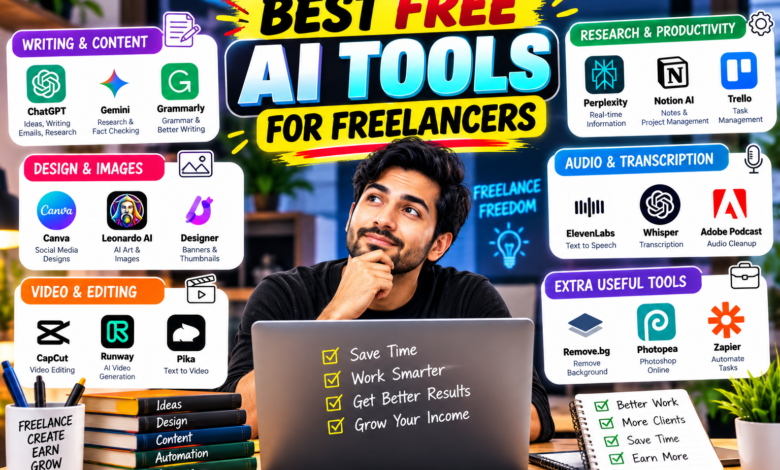
- General assistant: ChatGPT, Claude or Google Gemini (pick one and learn it well)
- Research with sources: Perplexity or NotebookLM
- Writing polish: Grammarly
- Design: Canva
- Meetings and calls: Otter
- Automating boring tasks: Zapier
The tools, grouped by job
1. General AI assistants: ChatGPT, Claude, Gemini
All three have free plans with usage limits. ChatGPT’s free tier includes web search, file and image uploads, data analysis and image creation, with rate limits and separate caps on some tools. Claude is a good fit for long-form writing and reading long documents. Gemini works well if you already live in Gmail and Google Docs.
Use it for: proposal drafts, client emails, outlines, summarizing a brief, brainstorming ideas. Upgrade when: you keep hitting the message limit during the workday. Plus-level plans usually cost around $20/month (see our Perplexity vs ChatGPT comparison for pricing details).
2. Research: Perplexity and NotebookLM
Perplexity gives answers with cited sources, so you can check a claim before it lands in a client report. NotebookLM from Google lets you upload your own documents and ask questions about them, which is handy for long briefs or research PDFs.
Use it for: market research, fact-checking, summarizing source material. Upgrade when: research is your main service and free search limits slow you down.
3. Writing polish: Grammarly
The free version catches grammar, spelling and clarity problems as you type. It won’t write for you, but it saves embarrassing typos in emails and proposals.
Use it for: final proofread of emails, pitches and articles. Upgrade when: you write for clients all day and want tone and rewrite suggestions.
4. Design: Canva
Canva’s AI design features are included in its plans, including the free one, though some premium features need a paid plan. It’s the quickest way to make a social post, a simple logo mock-up or a proposal cover.
Use it for: social graphics, presentations, simple branding. Upgrade when: you need brand kits, resizing in one click or premium stock assets.
5. Meeting notes: Otter
Otter records and transcribes calls so you don’t have to take notes while the client talks. According to Upwork’s guide, the basic plan has included 300 minutes of live transcription a month, with a 30-minute cap per conversation. That may have changed, so check Otter’s pricing page.
Use it for: client calls, interviews, kickoff meetings. Upgrade when: you run several calls a week and run out of minutes. Always tell people you’re recording.
6. Automation: Zapier
Zapier connects your apps so repetitive jobs run on their own, such as saving form entries to a spreadsheet or sending yourself a reminder. Its free plan is limited, so start with one simple automation.
Use it for: lead capture, invoice reminders, file organizing. Upgrade when: you rely on more than a couple of automations.
A free starter stack by freelancer type
- Writer or blogger: Claude or ChatGPT for outlines, Perplexity for fact-checks, Grammarly for the final pass.
- Designer or social media manager: Canva for graphics, ChatGPT for captions, Zapier to schedule reminders.
- Consultant or VA: Otter for call notes, ChatGPT or Gemini for follow-up emails, NotebookLM for client documents.
- Developer: ChatGPT or Claude for debugging help, Perplexity for documentation lookups.
Mistakes to avoid
- Signing up for ten tools and mastering none. Start with two or three.
- Sending AI-written text to a client without reading it. Edit it so it sounds like you.
- Pasting confidential client data into a free tool. Check the privacy settings first.
- Trusting numbers and quotes without opening the source.
- Paying for annual plans before you’ve used a tool for a month.
FAQ
What is the best free AI tool for freelancers? For most people, a general assistant like ChatGPT, Claude or Gemini. Pick one, use it daily for two weeks, then decide.
Can I make money using only free AI tools? Yes, many freelancers start that way. The tools speed up the work, but clients pay for your judgment and quality.
Are free AI tools safe for client work? Check each tool’s privacy and data settings, and avoid pasting sensitive or confidential information.
Do free plans stay free? Not always. Limits and features change, so check the official pricing pages.
Start small. Choose one assistant, one research tool and one design tool, and use them on real client work this week. When a free limit starts costing you time, that’s your signal to upgrade.
Sources
- eWeek: Best Free AI Tools for Work in 2026 (June 12, 2026)
- Upwork: The 17 Best AI Tools for Freelancers in 2026
Checked October 17, 2026. Free plan limits change often, so confirm on each tool’s official page.
About The Author





3 Comments